
Integrating External Business Systems with Microsoft Dynamics 365 Through Custom Development
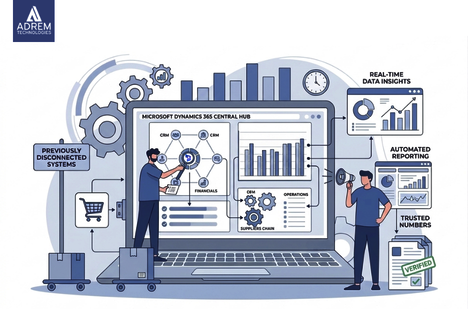
Introduction: When Systems Exist but Don’t Truly Connect
At some point, many growing businesses experience a subtle but persistent issue. On the surface, everything seems functional. Systems are in place, teams are working efficiently, and processes appear structured.
Yet, something still feels off.
Reports do not fully align. Teams double-check numbers that should already be reliable. Decisions take longer than expected. Over time, these small inefficiencies begin to accumulate.
This is usually when the idea of integrating external business systems with Microsoft Dynamics 365 through custom development becomes more than just a technical concept it becomes a practical necessity.
While Microsoft Dynamics 365 is a powerful platform, its full value only emerges when it connects seamlessly with other business systems. Without integration, data remains scattered, and teams spend more time searching for clarity than acting on insights.
Systems That Often Require Integration
| System Type | What It Handles | Why Integration Matters |
|---|---|---|
| ERP Systems | Finance and operations | Keeps financial and operational data aligned |
| CRM Platforms | Customer interactions | Creates a unified customer view |
| eCommerce Platforms | Orders and transactions | Syncs real-time sales data |
| HR Systems | Employee records | Maintains consistent workforce data |
| Marketing Tools | Campaign performance | Connects leads with revenue outcomes |
What Is Dynamics 365 Custom Integration?
At first glance, Dynamics 365 custom integration may sound highly technical. However, in practice, it is quite straightforward.
It involves connecting Microsoft Dynamics 365 with external systems in a way that reflects how a business actually operates not how software expects it to operate.
Every organization has its own workflow patterns. Some are structured, while others evolve over time. Custom integration respects this reality by adapting systems to people rather than forcing people to adapt to systems.
Why ERP System Integration Matters So Much
Financial and operational data sit at the core of every business. Therefore, even small inconsistencies can create significant challenges.
Without ERP integration:
-
Finance teams work with delayed or incomplete data
-
Sales teams operate without full visibility
-
Inventory issues surface unexpectedly
On the other hand, with proper integration:
-
Orders update across systems instantly
-
Financial data remains consistent
-
Teams begin to trust the numbers again
As a result, decision-making becomes faster and more reliable.
Dynamics 365 API Integration: The Silent Enabler
APIs rarely receive attention, yet they play a crucial role.
Dynamics 365 API integration enables systems to communicate in real time. When one system updates, others reflect those changes almost instantly.
Consequently:
-
Manual data transfers disappear
-
Communication delays are reduced
-
Operational clarity improves
It works quietly in the background, much like a well-coordinated team where everyone already knows what is happening.
The Value of Integration You Notice Over Time
Initially, integration may seem like a technical upgrade. However, its real value becomes visible gradually.
For example:
-
Teams stop requesting updated reports repeatedly
-
Data becomes reliable on the first review
-
Decisions happen with greater confidence
In regions like the UAE, where businesses often operate across multiple locations, this clarity becomes even more important. Growth without integration often leads to operational friction, while connected systems create smoother expansion.
Choosing the Right Integration Approach
Not all integration methods suit every business. Therefore, selecting the right approach depends on system complexity and future scalability.
Point-to-Point Integration
-
Simple and direct
-
Works well for smaller environments
-
However, it becomes difficult to manage as systems grow
Middleware Integration
-
Acts as a central connector
-
Provides better scalability
-
Ideal for growing organizations
Custom API Integration
-
Fully tailored to business needs
-
Requires more effort initially
-
Offers maximum flexibility and control
Integration Approach Overview
| Approach | Effort Level | Flexibility | Best Use Case |
|---|---|---|---|
| Point-to-Point | Low | Limited | Small setups |
| Middleware | Medium | Balanced | Growing businesses |
| Custom API | High | Extensive | Complex operations |
Common Challenges During Integration
Although integration delivers strong benefits, challenges may arise during implementation.
Some of the most common include:
-
Data formats that do not align
-
Legacy systems that resist integration
-
Security concerns around data exchange
-
Performance issues during peak usage
Therefore, careful planning and experienced guidance are essential to avoid disruptions.
Integration Trends Worth Noticing
As technology evolves, integration approaches continue to shift.
Currently, businesses are increasingly adopting:
-
Cloud-based integration solutions
-
Real-time data processing
-
AI-supported automation
These trends indicate a move toward systems that respond faster and require less manual intervention.
Why Custom Development Still Matters
Pre-built connectors can handle basic integrations. However, they rarely address complex or unique business requirements.

Custom development helps organizations:
-
Align systems with real workflows
-
Adjust integrations as operations evolve
-
Maintain control over system behavior
As a result, businesses gain flexibility without compromising efficiency.
The Role of Adrem Technologies
Companies like Adrem Technologies approach integration differently.
Instead of applying generic solutions, they focus on understanding how a business operates where delays occur, where teams struggle, and where inefficiencies exist.
Based on this understanding, they design integration systems that:
-
Remove operational friction
-
Improve data flow
-
Maintain simplicity
This practical approach ensures that integration supports real business needs rather than adding complexity.
Benefits of System Integration
| Outcome | Practical Impact |
|---|---|
| Real-time visibility | Faster and confident decisions |
| Reduced manual work | Teams focus on strategic tasks |
| Data consistency | Reliable reporting |
| Scalability | Easier business growth |
Practical Tips Before Starting Integration
Before beginning integration, consider these steps:
-
Understand existing workflows thoroughly
-
Clean and structure data before connecting systems
-
Test integrations carefully
-
Involve end users in the process
Because, in most cases, the people using the system daily understand its challenges best.
Conclusion: When Systems Finally Work Together
There is a noticeable shift when systems begin to function as one connected environment.
Data flows smoothly. Teams trust the information they see. Decisions become easier and faster.
Integrating external systems with Microsoft Dynamics 365 through custom development is not just a technical task it is a practical way to remove everyday inefficiencies.
With the right strategy and guidance from experts like Adrem Technologies, integration becomes a meaningful improvement rather than a complex project.
And once implemented, it often feels like it should have been there from the beginning.
Frequently Asked Questions
What is Dynamics 365 custom integration? It connects Microsoft Dynamics 365 with other systems based on how a business operates.
Why is ERP system integration important? It ensures financial and operational data remain aligned, improving accuracy and reducing confusion.
How does API integration help? It allows systems to communicate in real time, reducing delays and manual effort.
Is custom integration necessary for every business? Not always. However, it becomes essential for growing or complex operations.
How long does integration take? It depends on system complexity, but proper planning usually speeds up the process.
Frequently asked questions
What is Dynamics 365 custom integration?
It connects Microsoft Dynamics 365 with other systems based on how a business operates.
Why is ERP system integration important?
It ensures financial and operational data remain aligned, improving accuracy and reducing confusion.
How does API integration help?
It allows systems to communicate in real time, reducing delays and manual effort.
Is custom integration necessary for every business?
Not always. However, it becomes essential for growing or complex operations.
How long does integration take?
It depends on system complexity, but proper planning usually speeds up the process.
Tags
Author

Sara Adam