
How Microsoft Dynamics 365 Customization Supports Industry-Specific Business Processes
Introduction: When Business Software Doesn’t Quite Fit
Most companies invest in CRM systems with clear expectations: better customer tracking, faster communication, and clearer reporting.
However, something unexpected often happens after implementation. The system works technically, yet daily workflows feel slightly uncomfortable. Sales teams take extra steps to enter data. Support staff maintain side spreadsheets. Managers export reports just to understand what is happening.
The issue is rarely the software itself.
Instead, the system simply does not reflect how the business actually operates.
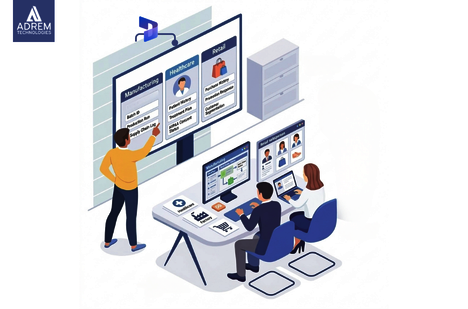
Different industries follow very different workflows. A manufacturing company manages production cycles and supply chains. A healthcare provider focuses on patient records and compliance. Retail businesses analyze customer behavior and promotions. Expecting all of them to use the same CRM structure rarely delivers the best results.
This is where Microsoft Dynamics 365 customization becomes valuable.
Rather than forcing businesses to adapt to software, customization allows the system to adapt to the business. Companies such as Adrem Technologies help organizations tailor CRM environments to match real operational processes, making systems feel intuitive rather than restrictive.
And that difference has a significant impact on adoption and efficiency.
Industry-Specific CRM Customization Examples
| Industry | Common Challenge | Example of Customization |
|---|---|---|
| Manufacturing | Managing production cycles | Custom production dashboards |
| Healthcare | Handling patient records securely | Patient workflow automation |
| Retail | Understanding buying behavior | Customer purchase analytics |
| Finance | Compliance and reporting | Financial dashboards |
| Logistics | Tracking shipments | Automated delivery tracking |
Many organizations report 30–40% efficiency improvements when CRM systems align with real workflows. The improvement comes not from new technology, but from better alignment.
Understanding Microsoft Dynamics 365 Customization
At its core, customization means adjusting the CRM system to reflect how a company actually works.
This may include modifying data structures, creating dashboards, or automating routine processes.
Common customization areas include:
-
Adjusting forms and fields to match industry terminology
-
Creating role-based dashboards for different departments
-
Automating repetitive tasks and workflows
-
Integrating CRM with ERP, finance, or inventory systems
-
Designing reports tailored to management needs
These changes may seem small individually. However, when combined, they significantly improve usability.
Employees spend less time navigating systems and more time doing meaningful work.
Why Industry-Specific CRM Customization Matters
Every industry operates with its own structure and priorities.
-
Manufacturers focus on production schedules and materials
-
Healthcare providers manage appointments and compliance
-
Retailers track customer preferences and sales trends
-
Logistics companies monitor shipments and delivery routes
When a CRM system does not reflect these workflows, teams often create workarounds outside the system.
Industry-specific customization eliminates these gaps.
For example:
-
A logistics company can track delivery routes and driver schedules
-
A consulting firm can manage project milestones and client engagements
-
A healthcare clinic can handle patient records and appointment flows
When systems align with operations, adoption improves naturally.
Improving Dynamics 365 Business Processes Through Customization
When organizations tailor CRM systems correctly, Dynamics 365 business processes become smoother and more efficient.
Consider sales operations:
Leads may come from multiple channels such as websites, emails, or referrals. Without automation, teams manually assign and track them.
With customization:
-
Leads can be automatically assigned
-
Follow-ups can be triggered instantly
-
Sales pipelines become easier to manage
Similarly, customer service teams benefit from automated ticket routing and case management.
Common Process Improvements
-
Faster lead response times
-
Better cross-department coordination
-
Reduced manual data entry
-
Clearer and more actionable reporting
These improvements may seem incremental, but they create significant operational gains over time.
Real Industry Use Cases
Manufacturing
Manufacturing businesses manage complex operations involving inventory, suppliers, and production timelines.
Customized CRM solutions often include:
-
Production planning dashboards
-
Supplier communication tracking
-
Inventory alerts for material shortages
These features give managers real-time visibility without relying on manual updates.
Retail and E-commerce
Retail businesses interact with customers across multiple channels, including stores, websites, and marketing campaigns.
Customized CRM systems help track:
-
Customer purchase history
-
Loyalty programs
-
Campaign performance
Retail teams gain better insight into customer behavior, improving marketing and sales strategies.
Key Areas of CRM Customization
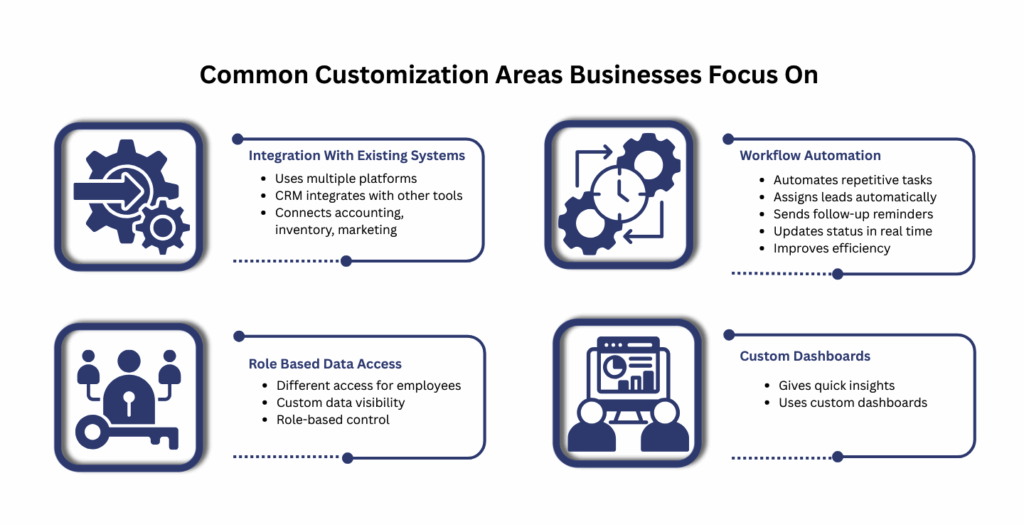
Across industries, several customization areas consistently deliver value.
Workflow Automation
Automates repetitive tasks such as lead assignment, follow-ups, and status updates.
Custom Dashboards
Provides department-specific insights for faster decision-making.
System Integration
Connects CRM with ERP, accounting, inventory, and marketing platforms.
Role-Based Access
Ensures employees see only the data relevant to their responsibilities.
These adjustments improve both system performance and user experience.
CRM Customization Trends Among Companies in the UAE
Digital transformation continues to accelerate across the region. Many Companies in the UAE are investing in CRM customization to improve customer engagement and operational efficiency.
Several factors drive this trend:
-
Competitive business environments
-
Diverse customer bases
-
Multilingual communication needs
-
Complex regulatory requirements
Customized CRM platforms help organizations address these challenges by supporting localized workflows and reporting standards.
Standard CRM vs Customized CRM
| Feature | Standard CRM | Customized CRM |
|---|---|---|
| Workflow design | Generic templates | Tailored processes |
| Reporting | Basic insights | Industry-specific analytics |
| User experience | Uniform | Role-based experience |
| Integration | Limited | Extended connectivity |
| Process alignment | Moderate | High |
Organizations often see higher adoption rates when CRM systems match daily workflows.
The Role of Technology Partners
CRM customization requires both technical expertise and a strong understanding of business processes.
Technology partners play a key role by:
-
Analyzing operational workflows
-
Designing system architecture
-
Customizing CRM features
-
Integrating systems across departments
-
Providing ongoing support
Companies like Adrem Technologies focus on practical implementation. Their goal is not to increase complexity, but to improve usability and business alignment.
Emerging Trends in Microsoft Dynamics 365
Recent developments in Microsoft Dynamics 365 highlight growing integration with artificial intelligence.
New capabilities include:
-
Predictive sales insights
-
Customer behavior analysis
-
Automated recommendations
These features enhance decision-making. However, they depend heavily on well-structured and customized systems.
Customization ensures that advanced features deliver meaningful value.
Business Impact of CRM Customization
Organizations that align CRM systems with real workflows often see measurable improvements.
Typical Outcomes
-
Improved coordination between departments
-
Faster customer response times
-
More accurate reporting
-
Reduced administrative workload
Industry estimates suggest:
-
Customer retention may improve by 20–25%
-
Employee adoption can increase significantly
Business Performance Improvements
| Business Area | Estimated Improvement |
|---|---|
| Sales productivity | 25–35% increase |
| Customer response time | ~20% faster |
| Data accuracy | ~30% improvement |
| Employee adoption | Up to 60% higher |
| Operational efficiency | 30–40% improvement |
These results demonstrate the value of aligning technology with real business processes.
Conclusion
Business software delivers the best results when it feels natural to use.
When employees trust the system and understand how it supports their work, adoption becomes seamless. This is why Microsoft Dynamics 365 customization continues to gain importance across industries.
By tailoring CRM systems to match real workflows, organizations improve efficiency, collaboration, and customer management without forcing teams to change how they work.
Customized Dynamics 365 business processes allow companies to operate more effectively while maintaining familiar workflows.
Technology partners such as Adrem Technologies help organizations design CRM environments that reflect real operational needs rather than generic structures.
In the end, the principle is simple:
Software should support the way people work not the other way around.
Frequently Asked Questions
What is Microsoft Dynamics 365 customization? It involves modifying CRM features, workflows, and data structures so the system aligns with a company’s specific business processes.
Why is industry-specific CRM customization important? Different industries have unique workflows. Customization ensures the CRM system reflects those operational needs.
How does customization improve business processes? Customization automates tasks, improves data organization, and provides relevant insights for better decision-making.
Do companies in the UAE use customized CRM systems? Yes. Many Companies in the UAE adopt customized CRM solutions to support digital transformation and improve customer engagement.
Can small businesses benefit from CRM customization? Absolutely. Even small adjustments can simplify workflows, improve efficiency, and enhance user adoption.
Frequently asked questions
What is Microsoft Dynamics 365 customization?
It involves modifying CRM features, workflows, and data structures so the system aligns with a company’s specific business processes.
Why is industry-specific CRM customization important?
Different industries have unique workflows. Customization ensures the CRM system reflects those operational needs.
How does customization improve business processes?
Customization automates tasks, improves data organization, and provides relevant insights for better decision-making.
Do companies in the UAE use customized CRM systems?
Yes. Many Companies in the UAE adopt customized CRM solutions to support digital transformation and improve customer engagement.
Can small businesses benefit from CRM customization?
Absolutely. Even small adjustments can simplify workflows, improve efficiency, and enhance user adoption.
Tags
Author

Sara Adam