
Custom Workflow Automation in Microsoft Dynamics 365 for Operational Efficiency
Introduction: When Simple Systems Stop Scaling
Many organizations begin with simple tools emails, spreadsheets, shared folders. At first, everything works smoothly. Everyone knows their role, and processes flow without much friction.
However, as the business grows, something changes.
Tracking becomes harder. Approvals take longer. Teams begin asking the same question repeatedly: who is responsible for the next step?
At first, these issues seem minor. A delayed response here. A missed update there. Yet over time, they compound into operational slowdowns. Sales follow-ups are delayed, customer requests sit unattended, and managers spend hours chasing updates instead of focusing on strategy.
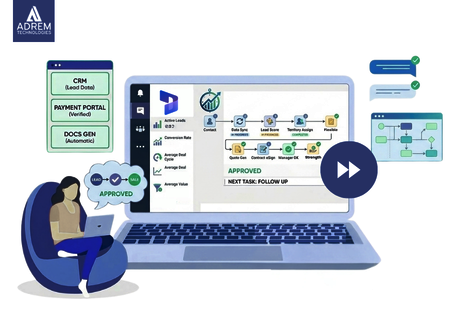
This is where custom workflow automation in Microsoft Dynamics 365 becomes highly relevant. Instead of relying on manual coordination, the system manages task flows in the background quietly, consistently, and reliably.
Companies like Adrem Technologies help organizations configure Dynamics 365 so workflows reflect real operational needs. The result is clear: fewer delays, defined responsibilities, and smoother execution.
Business Impact of Workflow Automation
| Business Activity | Without Automation | With Automated Workflows |
|---|---|---|
| Lead management | Delayed responses | Automatic lead assignment |
| Approval requests | Long email chains | Structured approval flows |
| Customer support | Scattered tickets | Organized tracking system |
| Reporting | Manual data compilation | Real-time dashboards |
Numbers show improvement, but the real impact appears in daily work. Teams experience less friction, and processes feel more predictable.
Understanding Workflow Automation
Workflow automation may sound technical, but the concept is simple.
A workflow is a sequence of steps required to complete a task. Automation ensures those steps happen automatically when certain conditions are met.
In Microsoft Dynamics 365, workflows can:
-
Assign leads to the right salesperson
-
Send reminders for follow-ups
-
Create service tickets automatically
-
Notify managers for approvals
Interestingly, automation does not remove human involvement it enhances it. By eliminating repetitive tasks, employees can focus on decision-making and problem-solving.
Why Operational Efficiency Matters
Every business aims to improve efficiency, even if it is not always measured formally.
Operational efficiency means using time, resources, and effort in the most effective way possible.
Without automation, common issues appear:
-
Tasks are delayed because someone forgets the next step
-
Information remains stuck in inboxes
-
Teams repeat manual work daily
These issues may seem small individually, but collectively they reduce productivity.
Automation introduces consistency and predictability. Once a process begins, the next step happens automatically no reminders needed.
Core Automation Capabilities in Microsoft Dynamics 365
Microsoft Dynamics 365 offers several automation features that organizations can customize.
Automatic Task Assignment
New leads or support requests are instantly assigned to the right team member.
Notifications and Reminders
Employees receive alerts for important actions, reducing missed deadlines.
Conditional Logic
Workflows adapt based on conditions for example, high-value deals may require additional approvals.
Integration with Microsoft Tools
Dynamics 365 integrates with:
-
Microsoft Teams
-
Outlook
-
SharePoint
-
Power Automate
This allows workflows to move seamlessly across communication and operational systems.
Where Automation Delivers the Most Value
Automation often improves multiple departments at once. Even small workflow changes can create organization-wide impact.
Sales Operations
-
Automatic lead assignment
-
Follow-up reminders
-
Deal stage updates
-
Performance reporting
Customer Service
-
Instant ticket creation
-
Issue routing to correct teams
-
Resolution tracking
-
Customer notifications
Finance
-
Invoice approvals
-
Payment reminders
-
Purchase authorization workflows
Human Resources
-
Candidate tracking
-
Interview scheduling
-
Employee onboarding
Departmental Impact of Automation
| Department | Workflow Example | Benefit |
|---|---|---|
| Sales | Lead assignment | Faster response times |
| Customer Service | Ticket routing | Reduced resolution time |
| Finance | Invoice approvals | Faster processing |
| HR | Recruitment tracking | Organized hiring |
CRM Workflow Customization for Real Processes
No two organizations operate the same way.
-
Logistics companies manage shipments
-
Consulting firms track projects
-
Retail businesses focus on orders and inventory
Because of this, CRM workflow customization is essential.
Customization allows businesses to:
-
Define approval hierarchies
-
Automate industry-specific processes
-
Integrate external systems
-
Control data flow between teams
When workflows match real operations, adoption improves significantly.
The Role of Automation in Digital Growth
Digital transformation often sounds like a major shift. In reality, it usually begins with small improvements.
-
Automating lead assignment
-
Streamlining service requests
-
Reducing manual approvals
Over time, these small changes reshape how teams operate.
Microsoft Dynamics 365 supports this gradual transformation by providing a stable system that manages daily processes efficiently.
Automation Trends Among Companies in the UAE
Many Companies in the UAE are investing in automation as part of digital transformation initiatives.
Industries leading adoption include:
-
Logistics
-
Financial services
-
Retail
-
Property management
These sectors manage high volumes of transactions and interactions, making automation essential for maintaining efficiency and accuracy.
How Adrem Technologies Supports Automation
Technology alone is not enough. Successful automation requires thoughtful implementation.
Adrem Technologies supports organizations by:
-
Analyzing existing workflows
-
Identifying repetitive tasks
-
Designing automation strategies
-
Configuring Dynamics 365 systems
-
Training teams for adoption
This ensures automation improves workflows rather than adding complexity.
Automation Implementation Stages
| Stage | Activity | Outcome |
|---|---|---|
| Process Review | Analyze workflows | Identify opportunities |
| Workflow Design | Configure rules | Structured processes |
| Integration | Connect systems | Consistent data flow |
| Training | Educate teams | Smooth adoption |
Practical Advice for Getting Started
Organizations often wonder where to begin.
The answer is simple: start small.
Begin with tasks such as:
-
Lead assignment
-
Approval notifications
-
Service ticket creation
-
Reminder emails
Once teams see the benefits, expanding automation becomes easier.
Trying to automate everything at once often leads to unnecessary complexity.
Conclusion
Operational efficiency is not just about working harder. It is about creating systems that help people work smarter.
Custom workflow automation in Microsoft Dynamics 365 brings structure to daily operations, reduces manual effort, and ensures tasks move smoothly across teams.
With the right approach, organizations can transform routine activities into reliable, time-saving processes that improve collaboration and support long-term growth.
And something interesting happens when workflows run quietly in the background teams spend less time managing processes and more time moving the business forward.
Frequently Asked Questions
What is Dynamics 365 workflow automation? It refers to automated processes in Microsoft Dynamics 365 that trigger actions such as notifications, approvals, and task assignments.
Why is CRM workflow customization important? Because every organization operates differently. Custom workflows ensure the system aligns with real business processes.
Can small businesses benefit from automation? Yes. Even simple automation can save time and improve efficiency for small teams.
How long does implementation take? Smaller projects may take a few weeks, while larger implementations require more planning.
Are Companies in the UAE adopting Dynamics 365? Yes. Many Companies in the UAE use it to improve operations, customer management, and reporting.
Frequently asked questions
What is Dynamics 365 workflow automation?
It refers to automated processes in Microsoft Dynamics 365 that trigger actions such as notifications, approvals, and task assignments.
Why is CRM workflow customization important?
Because every organization operates differently. Custom workflows ensure the system aligns with real business processes.
Can small businesses benefit from automation?
Yes. Even simple automation can save time and improve efficiency for small teams.
How long does implementation take?
Smaller projects may take a few weeks, while larger implementations require more planning.
Are Companies in the UAE adopting Dynamics 365?
Yes. Many Companies in the UAE use it to improve operations, customer management, and reporting.
Tags
Author

Sara Adam