
How Enterprise System Integration Improves Cross-Department Collaboration
Introduction
Every growing organization eventually encounters a challenge that is not immediately obvious. Teams work diligently, departments use various tools, and each group believes it is contributing effectively. Yet projects begin slowing down, communication becomes fragmented, and decisions take longer than expected.
Often, the problem is not a lack of talent or motivation. Instead, the issue lies in disconnected systems that prevent departments from sharing information efficiently.
This is where enterprise system integration becomes essential.
Consider a common workplace scenario. A sales team needs financial confirmation to finalize a deal, but finance must verify the numbers manually. Meanwhile, marketing requests customer insights stored in another system. These small delays accumulate over time and reduce productivity.
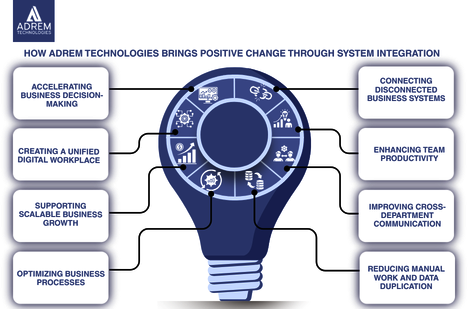
Enterprise system integration addresses this challenge by connecting different business applications such as ERP, CRM, HR, and analytics systems so that information flows automatically across departments.
Organizations that implement integration solutions frequently notice a remarkable change: teams stop operating in isolation and begin collaborating through shared data and synchronized processes.
Technology providers such as Adrem Technologies focus on helping organizations bridge system gaps and connect enterprise applications, enabling smoother collaboration across departments.
Understanding how enterprise system integration improves cross-department collaboration is therefore not just an IT conversation it is a strategic leadership decision that influences communication, efficiency, and innovation.
Collaboration Challenges Without System Integration
Disconnected systems create several obstacles for modern organizations.
| Collaboration Challenge | Without Integration | With Enterprise System Integration |
|---|---|---|
| Data accessibility | Information stored in separate systems | Shared data across departments |
| Communication | Long email chains and manual updates | Real-time system communication |
| Decision making | Delays due to fragmented data | Faster decisions with unified insights |
| Productivity | Employees repeat tasks or search for information | Teams focus on strategic work |
When systems communicate seamlessly, teams gain the information they need without relying on manual coordination.
Understanding Enterprise System Integration
Enterprise system integration connects different software platforms so they can exchange data automatically.
Key characteristics include:
-
Connecting systems such as CRM, ERP, HR platforms, and analytics tools
-
Enabling automatic data exchange between applications
-
Creating a unified information flow across departments
-
Allowing employees to access consistent data across systems
-
Reducing manual data entry and minimizing errors
Organizations that begin integrating their systems often discover how much time employees previously spent searching for information that already existed elsewhere.
Key Technologies Behind System Integration
Several technologies enable enterprise system integration.
-
APIs (Application Programming Interfaces) allow software systems to communicate directly.
-
Middleware platforms act as connectors between applications.
-
Cloud integration tools synchronize systems across environments.
-
Data pipelines move structured information between systems.
Although these technologies may sound technical, their real impact appears in everyday business operations particularly in how departments collaborate.
Why Cross-Department Collaboration Breaks Down
Many organizations believe their teams collaborate effectively. However, deeper analysis often reveals hidden inefficiencies.
Common causes include:
-
Departments storing information in separate applications
-
Teams duplicating work due to disconnected systems
-
Managers relying on outdated reports
-
Communication depending heavily on manual updates
Consider a product launch scenario. Marketing prepares campaigns, sales handles outreach, and operations manage logistics. If each department uses different data sources, miscommunication becomes inevitable.
A Simple Workplace Example
Imagine a mid-sized retail company.
-
The sales team updates customer orders in a CRM system.
-
The finance department records payments in accounting software.
-
The logistics team manages shipments using warehouse software.
Without integration, each department must manually share updates. This leads to errors, delays, and miscommunication.
With integration, these systems exchange information automatically. Suddenly collaboration becomes smoother because everyone works with the same real-time data.
Real-World Scenario: Integration in Action
A manufacturing company once struggled with delayed product deliveries.
The problem was not production capacity but data fragmentation.
-
Sales promised delivery dates based on outdated inventory reports.
-
Operations updated stock levels in a separate system.
-
Finance tracked order payments independently.
After integrating their ERP, CRM, and inventory systems, communication improved significantly.
| Department | Before Integration | After Integration |
|---|---|---|
| Sales | Relied on outdated inventory reports | Access real-time stock data |
| Operations | Received delayed order updates | Instantly notified of new orders |
| Finance | Required manual reconciliation | Automated financial tracking |
As a result, delivery delays decreased and customer satisfaction improved.
How Enterprise System Integration Improves Collaboration
At its core, enterprise integration removes the barriers that separate departments.
Instead of working with fragmented information, teams operate within a shared data ecosystem.
Shared Data Creates a Common Language
When systems are integrated, departments work from consistent information.
Examples include:
-
Sales and marketing accessing the same customer data
-
Finance and operations viewing identical inventory reports
-
Leadership reviewing unified performance dashboards
When everyone uses the same data, misunderstandings decline significantly.
Faster Communication Between Teams
Integration enables communication through automated system interactions rather than manual messages.
For example:
-
Systems trigger automatic notifications
-
Workflow automation transfers tasks between departments
-
Dashboards provide real-time project updates
-
Reports update automatically across platforms
This reduces time spent requesting information and increases time spent solving problems.
Reduced Friction Between Departments
Integrated systems simplify collaboration by eliminating repetitive work.
Benefits include:
-
Reduced manual data entry
-
Fewer reporting discrepancies
-
Greater trust in shared data
-
Faster execution of cross-functional projects
Employees often describe integration as removing unnecessary complexity from their daily work.
Benefits for Leadership and Decision Makers
Enterprise integration also provides significant advantages for executives and decision-makers.
| Leadership Benefit | Impact |
|---|---|
| Unified analytics | Improved strategic planning |
| Real-time data visibility | More confident decision making |
| Cross-department reporting | Greater accountability |
| Operational transparency | Faster identification of problems |
With integrated systems, leaders gain a clearer picture of organizational performance.
The Human Side of System Integration
Technology discussions often overlook the human element.
However, employees typically experience several positive changes when systems become integrated:
-
Reduced frustration when searching for data
-
Greater confidence in reports and dashboards
-
Improved collaboration with colleagues
-
More time for meaningful and strategic work
One project manager once described system integration as “lifting the fog.” Once teams trusted the data, they could focus on improving customer experience instead of debating which spreadsheet was correct.
Integration as a Foundation for Innovation
When systems communicate effectively, organizations gain the freedom to innovate.
Examples include:
-
Product teams analyzing integrated customer feedback
-
Marketing teams identifying behavior patterns
-
Operations teams optimizing supply chain processes
-
Leadership exploring new data-driven opportunities
Innovation often begins with access to reliable information.
Challenges Organizations Should Consider
Despite its benefits, enterprise integration requires careful planning.
Key considerations include:
-
Legacy system compatibility
-
Strong data governance policies
-
Well-designed integration architecture
-
Employee training and change management
Addressing these factors early helps organizations avoid implementation difficulties.
How Adrem Technologies Supports Enterprise Integration
Many companies partner with technology consultants to design and implement integration strategies.
Adrem Technologies specializes in helping organizations connect complex enterprise systems so departments can collaborate effectively.
Their approach focuses on understanding business workflows first and then designing integration solutions that support real operational needs.
This ensures that technology improves collaboration rather than introducing new complications.
Practical Steps to Begin Enterprise Integration
Organizations interested in system integration can start with a structured approach:
-
Identify critical systems that store business data
-
Map information flows between departments
-
Prioritize high-impact integrations
-
Implement APIs or integration platforms
-
Train employees on updated workflows
Small integration initiatives often evolve into broader digital transformation programs.
Conclusion
Organizations rarely struggle with collaboration because employees lack motivation. More often, the problem lies in disconnected systems that create invisible barriers between departments.
Enterprise system integration removes those barriers by enabling applications to share information automatically.
When organizations integrate their systems:
-
Data becomes reliable and accessible
-
Teams collaborate more naturally
-
Leadership gains clearer insights
-
Innovation becomes easier
Companies like Adrem Technologies demonstrate how thoughtful integration strategies can connect systems, align teams, and improve operational efficiency.
Ultimately, enterprise integration is not only about connecting software. It is about connecting people, processes, and information so organizations can move forward with clarity and confidence.
Frequently Asked Questions
What is enterprise system integration? Enterprise system integration connects different business software applications such as ERP, CRM, and HR systems so they can share data automatically.
Why is system integration important for collaboration? Integration enables departments to access the same information in real time, reducing communication delays and improving coordination between teams.
Which systems are commonly integrated in organizations? Common integrations include ERP systems, CRM platforms, HR management software, inventory systems, and analytics tools.
Can system integration improve decision making? Yes. When data from multiple departments is consolidated, leaders gain more accurate insights and can make faster strategic decisions.
How can Adrem Technologies help with system integration? Adrem Technologies provides consulting and implementation services that help organizations connect enterprise systems, streamline workflows, and improve cross-department collaboration.
Frequently asked questions
What is enterprise system integration?
Enterprise system integration connects different business software applications such as ERP, CRM, and HR systems so they can share data automatically.
Why is system integration important for collaboration?
Integration enables departments to access the same information in real time, reducing communication delays and improving coordination between teams.
Which systems are commonly integrated in organizations?
Common integrations include ERP systems, CRM platforms, HR management software, inventory systems, and analytics tools.
Can system integration improve decision making?
Yes. When data from multiple departments is consolidated, leaders gain more accurate insights and can make faster strategic decisions.
How can Adrem Technologies help with system integration?
Adrem Technologies provides consulting and implementation services that help organizations connect enterprise systems, streamline workflows, and improve cross-department collaboration.
Tags
Author

Sara Adam