


When Powerful Tools Quietly Go Unused
It is interesting how quickly organisations adopt new technology and how quietly adoption can stall afterward.
At first, Microsoft 365 Copilot generates excitement. Demonstrations look impressive. Early use cases feel promising.
However, once rollout begins, the experience often changes.
Gradually, teams realise that:
- Outputs need refinement
- Prompts require thought
- Results are not always immediate
As a result, what initially felt like a shortcut can start to feel like extra effort.
This shift is subtle but important.
The real issue is not whether the tool works. It does. The challenge lies in whether people feel confident, supported, and motivated to use it consistently.
That is where adoption tends to break down.
What Drives Success vs What Causes Struggle
| Area | When It Struggles | When It Works Well |
|---|---|---|
| Leadership | Distant, hands-off | Present and engaged |
| Training | One-time sessions | Continuous learning |
| Use Cases | Unclear or generic | Role-specific and practical |
| Employee Mindset | Hesitant | Curious and open |
| Integration | Feels separate | Feels embedded in workflows |
Understanding Copilot Adoption Challenges
Why Copilot Feels Powerful Yet Difficult
At its core, Copilot depends heavily on context. Without clear input, results can feel inconsistent.
Meanwhile, many users expect instant answers. In reality, Copilot works best when guided thoughtfully much like a junior assistant.
Additionally, adopting Copilot introduces a subtle shift in how work gets done. Naturally, not everyone feels comfortable changing established habits.
Consequently, without clear direction, employees often return to familiar methods even if they are less efficient.
The Expectation vs Reality Gap
Another key issue emerges early.
Organisations often introduce Copilot with high expectations but limited preparation.
Because of this:
- First impressions may feel confusing
- Early results may seem inconsistent
- Users may disengage quietly
Over time, this gap between expectation and experience reduces enthusiasm and slows adoption.
Top Reasons Why Microsoft 365 Copilot Adoption Fails
1. Lack of Clear Use Cases
To begin with, many employees are told Copilot can help but not how.
Without practical examples:
- The tool feels abstract
- Relevance is unclear
- Adoption becomes optional
As a result, teams fall back on familiar workflows.
2. Weak Change Management
In many cases, organisations treat adoption as a one-time rollout rather than an ongoing process.
However, real change requires:
- Continuous communication
- Open feedback channels
- Employee involvement
Without these, resistance builds quietly.
3. Inadequate Training
Although training is often provided, it is rarely sufficient.
A single session may introduce features but it does not build confidence.
Instead, effective learning requires:
- Ongoing reinforcement
- Hands-on practice
- Real-world scenarios
Without this, knowledge fades quickly.
4. Limited Leadership Involvement
Leadership behaviour strongly influences adoption.
When leaders do not actively use Copilot:
- It appears optional
- Accountability decreases
- Engagement drops
Conversely, visible leadership participation builds trust and momentum.
5. Data and Security Concerns
Finally, concerns around data usage can slow adoption significantly.
If policies are unclear:
- Employees hesitate
- Trust declines
- Usage decreases
Therefore, transparency becomes essential.
How to Get Microsoft 365 Copilot Adoption Right
1. Define Practical Use Cases
First and foremost, connect Copilot to real tasks.
For example:
- Drafting emails
- Summarising meetings
- Organising notes
When employees see immediate value, adoption improves naturally.
2. Invest in Continuous Training
Rather than relying on one-time sessions, focus on ongoing learning.
Effective approaches include:
- Short, regular training sessions
- Hands-on exercises
- On-demand resources
As a result, confidence builds over time.
How Training Impacts Adoption
| Approach | Experience | Outcome |
|---|---|---|
| One-time session | Informative but brief | Low retention |
| Periodic sessions | Reinforcing | Moderate confidence |
| Continuous learning | Practical and evolving | Strong adoption |
3. Encourage Leadership Participation
When leaders actively engage with Copilot:
- Teams follow their example
- Adoption gains credibility
- Engagement increases
Even sharing challenges helps make the process relatable.
4. Build a Culture of Experimentation
Importantly, adoption improves when employees feel safe to explore.
Encourage:
- Trial and error
- Open feedback
- Knowledge sharing
Over time, experimentation builds confidence.
5. Align Copilot with Business Goals
Finally, connect usage to measurable outcomes.
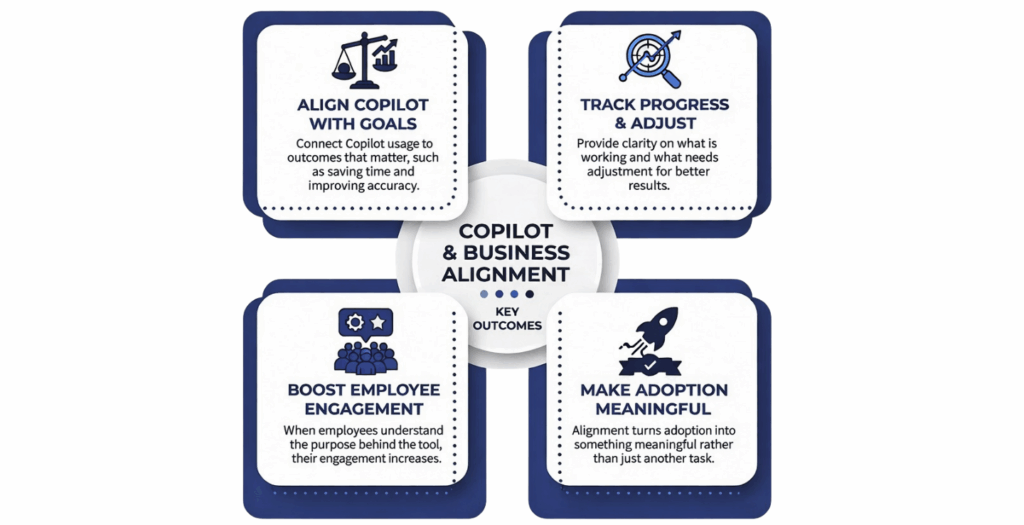
For instance:
- Time savings
- Improved accuracy
- Faster workflows
When employees understand the purpose, engagement becomes meaningful.
From Hesitation to Engagement
| Concern | What Helps |
|---|---|
| Uncertainty | Clear guidance |
| Lack of confidence | Hands-on support |
| Skepticism | Real examples |
| Fear of change | Gradual introduction |
Advanced Strategies for Long-Term Success
Create Internal Champions
Identify early adopters and empower them to share their experiences.
These individuals:
- Influence peers
- Provide practical insights
- Sustain momentum
Measure What Matters
Instead of focusing only on usage metrics, evaluate real impact.
Ask:
- Is time being saved?
- Are workflows improving?
- Are employees finding value?
This approach keeps adoption relevant.
Integrate Copilot into Daily Workflows
Most importantly, Copilot should feel natural not additional.
Avoid:
- Extra steps
- Complex processes
Instead, embed it into existing workflows. When it becomes part of routine tasks, adoption follows naturally.
The Role of Practical Implementation Support
Organisations that succeed often focus on behaviour not just technology.
For example, Adrem Technologies emphasizes how people interact with tools rather than simply deploying them.
Their approach highlights a key insight:
Adoption is not a technical challenge it is a human one.
Final Thoughts
Technology rarely fails on its own.
More often, adoption struggles because people are not given:
- Enough time
- Enough guidance
- Enough confidence
Microsoft 365 Copilot is no exception.
When introduced thoughtfully, supported consistently, and aligned with real work, it becomes genuinely useful.
Organisations that succeed tend to:
- Move gradually
- Listen actively
- Adapt continuously
Ultimately, adoption improves when the experience feels natural not forced.
And perhaps that is the most important takeaway.
Focus less on the tool and more on how people experience it.
Because when people feel supported, adoption follows.
Frequently Asked Questions
Common reasons include unclear use cases, weak training, limited leadership involvement, and lack of change management.
Not necessarily. However, it requires clear input and practice to deliver consistent results.
By focusing on continuous training, practical use cases, leadership engagement, and workflow integration.
Yes. Employees often follow leadership behaviour, so active participation significantly improves adoption.
Adoption improves gradually. With the right approach, organisations typically see meaningful progress within a few months.
